Start with the product and marketplace you actually need
A spreadsheet makes a search easier to work with, but it does not make unrelated listings comparable. Start with the model, size or variant that matters. For this walkthrough, we use Sony WH-1000XM5 and the US marketplace, ebay.com.
Open Dashboard Search, enter the product, and choose the eBay site beside the search box. Use More filters to adjust the result ceiling, condition and price range. UK prices belong on ebay.co.uk; Australian prices belong on ebay.com.au. Choose the marketplace before exporting rather than changing the currency symbol afterward.
Leave AI Relevance enabled for an initial cleanup, then review the results yourself. It helps remove irrelevant items but does not establish that every row matches the exact variant or condition you need.
Open the headphone searchSign in or create an account if prompted. The link preserves the keyword and marketplace; it does not run a search until you press Search.

Review the results, then download one CSV
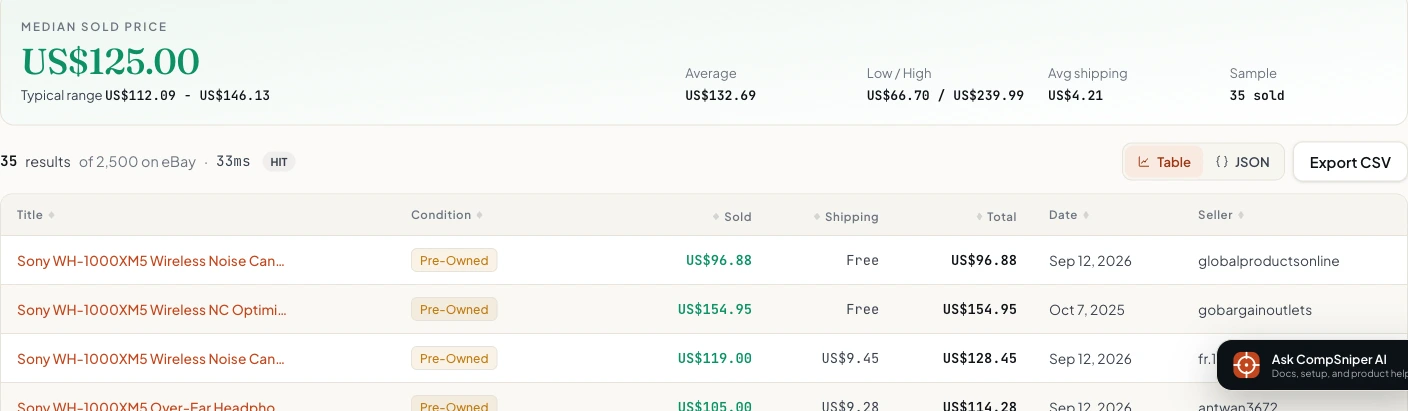
After the search finishes, inspect the titles, condition, sold dates and prices. Keep replacement parts, bundles and different models out of the comparison you build in your spreadsheet. Next, select Export CSV above the results table.
The browser downloads a file named after the search, such as compsniper-sony-wh-1000xm5.csv. Exporting uses the results already loaded in your browser, so clicking the button does not run another search.
Download the example CSV to follow the spreadsheet steps without running a new search. It is a fixed example captured for this guide, not a live feed.
In this demonstration, we requested up to 60 results and received 35. The table showed 25 rows on its first page, while the CSV contained all 35. The export is unchanged: it includes mixed conditions and source dates that need review before a pricing analysis.
No Excel? Open the file in Google Sheets
Google Sheets works in a browser. Start a blank spreadsheet, choose File > Import > Upload, and select the downloaded CSV. Import it into a new spreadsheet or a new sheet so you do not replace an existing worksheet.
Choose Comma if automatic separator detection does not split the columns correctly. Turn off Convert text to numbers, dates, and formulas for a text-preserving import. This keeps listing IDs intact and prevents spreadsheet software from interpreting text unexpectedly. You can convert the price and date columns deliberately afterward.
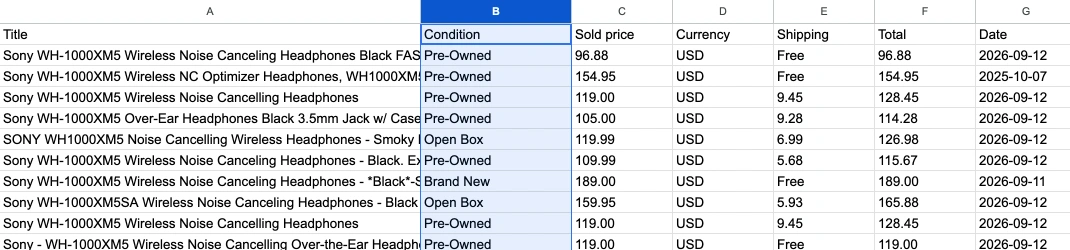
Freeze the header row and turn on a filter if you are reviewing many rows. Widen Title enough to read the product identity, and keep Currency visible beside Sold price. When you need an Excel workbook, choose File > Download > Microsoft Excel (.xlsx).
If you used the text-preserving import and want to calculate with prices, add a working column called Numeric sold price. Use =IF(C2="","",VALUE(C2)) for the first data row and fill it down through the imported rows. Keep the original Sold price column unchanged, and check the sheet's locale if decimal points are not interpreted correctly.
Google documents the File, Import and Upload workflow and working between Sheets and Excel.
Import the CSV into Excel without losing the identifiers
In desktop Excel, use Data > From Text/CSV rather than relying on a double-click import. Select the file, check that the delimiter is a comma, and review the preview before loading. Use the transformation step to keep Item ID as text and assign numeric types to prices deliberately.
If the entire row appears in one cell, the delimiter was not interpreted correctly. If the title contains broken accented characters, select UTF-8 as the file encoding. A CSV file does not preserve column widths, colors or extra worksheets, so save your working copy as .xlsx after formatting it.
The screenshots in this guide show CompSniper and Google Sheets. Excel menu guidance follows Microsoft's import documentation; no Excel installation is required to use the Google Sheets workflow.
Know what each exported column means
| Column | How to use it |
|---|---|
| Title / Condition | Check the product, model and condition before combining rows. A blank condition means it was not available, not that the item was new. |
| Sold price / Currency | Keep the numeric amount beside its currency. Do not mix USD, GBP, EUR or AUD in one average. |
| Shipping / Total | Shipping can contain Free, a numeric amount, or a blank. Total is the combined amount when available, not the seller's profit after fees and tax. |
| Date | The visible sold date. Import it consistently before sorting or grouping by month. |
| Seller / Item ID / URL | Keep these alongside the price so you can check the source and identify repeated listings. Import Item ID as text. |
The standard dashboard CSV is a compact ten-column export. It does not contain every JSON response field. In particular, it does not include bestOfferAccepted. Check the JSON when that marker matters: the visible price on an accepted-offer listing may differ from the amount the buyer actually paid.
Before calculating a median, separate currencies, conditions, variants and lots. A blank shipping amount is unknown, not automatically zero. Keep a copy of the untouched export and do your filtering in a working copy. Our sample-size guide explains why the quality of the comparisons matters more than a large row count.
For a repeatable workflow, export the API response
The standard /v1/scrape endpoint in the CompSniper REST API returns JSON rather than CSV. If you need scheduled files or an inventory integration, request the data and write the fields into a CSV with your language's CSV library.
Python example: one search to a CSV file
Set COMPSNIPER_API_KEY in your server or terminal environment first. This example uses Python's standard library and writes the same ten columns as the dashboard.
# Python 3. Uses only the standard library.
import csv
import json
import os
from urllib.parse import urlencode
from urllib.request import Request, urlopen

params = urlencode({
    "keyword": "Sony WH-1000XM5",
    "ebaySite": "ebay.com",
    "sold": "true",
    "count": 60,
    "relevance": "true",
})
request = Request(
    "https://api.compsniper.com/v1/scrape?" + params,
    headers={"Authorization": "Bearer " + os.environ["COMPSNIPER_API_KEY"]},
)
with urlopen(request, timeout=75) as response:
    data = json.load(response)

with open("sold-listings.csv", "w", newline="", encoding="utf-8-sig") as output:
    writer = csv.writer(output)
    writer.writerow(["Title","Condition","Sold price","Currency","Shipping","Total","Date","Seller","Item ID","URL"])
    for item in data.get("items", []):
        writer.writerow([
            item.get("title"), item.get("condition"),
            item.get("soldPrice"), item.get("soldCurrency"),
            "Free" if item.get("shippingType") == "free" else item.get("shippingPrice"),
            item.get("totalPrice"), item.get("endedAt"),
            item.get("sellerUsername"), item.get("itemId"), item.get("url"),
        ])

print("Exported", len(data.get("items", [])), "rows to sold-listings.csv")
An API error stops the script before it writes an export. An empty successful result creates a header-only file. The example does not loop through pages or retry a failed request. For many products, see the Bulk Search API and error guidance.
Questions about eBay sold-data exports
Can I export eBay sold listings without writing code?
Yes. Search in the CompSniper dashboard, choose the eBay marketplace, review the returned results, and click Export CSV. This exports the currently loaded result set without running another search.
Do I need Microsoft Excel to open the export?
No. You can import the CSV into Google Sheets in a web browser. Excel and other spreadsheet applications can also open CSV files. CSV stores rows and columns, not workbook formatting or multiple tabs.
Does Export CSV download only the visible table page?
No. It exports every row in the current returned result set, not only the rows on the visible dashboard table page. It does not fetch additional eBay result pages or export every sale from eBay.
How many sold listings can I export at once?
A standard search can request up to 240 rows. The returned number can be lower because of availability, filters, and relevance cleanup. The CSV contains the rows returned by that search.
Can I export UK or Australian eBay sold prices?
Yes. Choose the marketplace before searching, such as ebay.co.uk or ebay.com.au. Keep the Currency column and do not combine prices from different currencies as if they were the same unit.
Does the CSV include the accepted Best Offer price?
The displayed sold price is not necessarily the accepted Best Offer amount. The dashboard CSV does not include a Best Offer flag. Use the JSON response's bestOfferAccepted field when you need that marker, and do not treat it as disclosure of a hidden accepted amount.
Written by CompSniper's founder. Screenshots and the example export use an owner-run demonstration, not customer activity. CompSniper is independent of eBay. Read our methodology and source limitations.