How can you easily get eBay sold comps?
Use CompSniper's GET /v1/scrape endpoint with a product keyword and your API key. It returns sold listings with price, currency, condition, shipping and sale date. Start with ten rows, inspect the result, then add the filters your app needs. You can request up to 240 rows when you are ready for a larger sample.
The easy part is the setup: one account, one key and one request. You do not need to build a scraper before finding out whether the data fits your project. If you prefer not to write code, use the dashboard search and export a CSV instead.
Start with 100 free requestsNo credit card required. This is our practical CompSniper walkthrough, not a measured speed ranking of every available service.
Set up the request in Postman
Create your free account and copy the full API key from Dashboard → API keys. It starts with cs_live_. In Postman, create an HTTP request and select GET.
https://api.compsniper.com/v1/scrapeOpen Authorization, choose Bearer Token and paste your key into the Token field. Do not add the word Bearer yourself in that field; Postman supplies it in the outgoing header.
Next, open Params and add these checked rows:
| Key | Value |
|---|---|
| keyword | Nintendo Switch OLED |
| count | 10 |
| ebaySite | ebay.com |
| sold | true |
?keyword= followed by the search term.Click Send. A successful request returns HTTP 200 and a JSON response. If it returns an error, read the body and keep the request ID. An error is not evidence that the product has no sold listings.
Here is what a real sold listing looks like
Our September 22, 2026 walkthrough returned ten Nintendo Switch OLED listings. This is a shortened excerpt from one listing shown in the recording, with unrelated fields omitted:
{
  "title": "Nintendo Switch OLED with dock, wrist straps, and Mario case, and AC adapter",
  "condition": "Pre-Owned",
  "conditionId": 3000,
  "shippingPrice": "10.93",
  "shippingCurrency": "USD",
  "totalPrice": "158.93",
  "endedAt": "2026-09-21",
  "soldPrice": "148.00",
  "soldCurrency": "USD"
}
The item price is USD 148.00. Shipping is USD 10.93, making the known combined amount USD 158.93. The sale date is September 21, 2026. These are recorded example values, not a current Nintendo Switch valuation.
Before using any row as a sold comp, check that it describes the configuration you are pricing. This one includes a dock, wrist straps, a case and an adapter. A tablet-only console or a bundle with several games is not automatically an equivalent comparison.
Keep currency and shipping with the price. Missing shipping is unknown, not free. If bestOfferAccepted is true, the displayed price may not reveal the exact negotiated amount; add bestOfferPrice=true to get it on US-dollar sales (see accepted Best Offer prices). The API reference explains the fields.
Make the next request more useful: used consoles only
Add itemCondition=used as another checked Params row, then send the request again. That is a small, useful next step: you are narrowing the data to the condition relevant to your application.
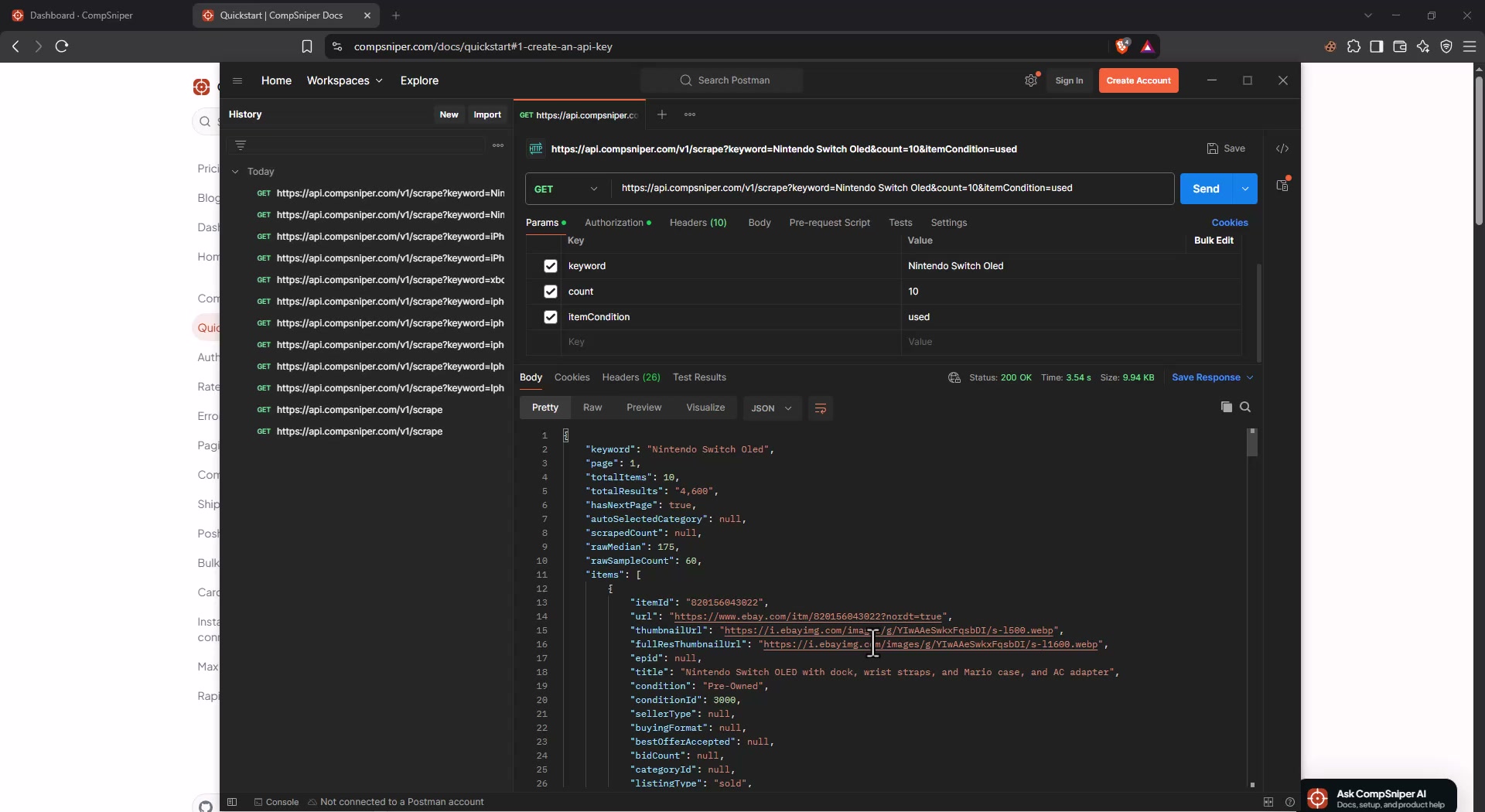
CompSniper also offers optional relevance cleanup to help remove unrelated listings. You can use relevance=false if your workflow needs to do its own query-aware filtering. The recording demonstrates the condition filter, not an AI-filtering before-and-after test.
Copy the same search into your app
Once you understand the response, Postman has done its job. The same request can run from your backend, a script or a scheduled workflow. Here is the complete terminal version of the first search:
# Replace the placeholder with your full CompSniper key.
export COMPSNIPER_API_KEY="cs_live_REPLACE_WITH_YOUR_KEY"

curl --get --fail-with-body --max-time 75 \
  --header "Authorization: Bearer $COMPSNIPER_API_KEY" \
  --data-urlencode "keyword=Nintendo Switch OLED" \
  --data-urlencode "count=10" \
  --data-urlencode "ebaySite=ebay.com" \
  --data-urlencode "sold=true" \
  "https://api.compsniper.com/v1/scrape"
The 75-second limit is a client-side timeout, not a promised response time. Keep your real key on your backend. Start with one request and handle errors before adding repeated searches.
For a full integration, use the Python guide or JavaScript and TypeScript guide. For many independent keywords, follow the documented async-job guidance instead of launching an unrestricted batch of simultaneous requests.
Choose the next step that matches your workflow
- Building an app? Keep the request on your server and pass the relevant fields to your interface.
- Working in a spreadsheet? Use the dashboard and our CSV and Excel walkthrough.
- Using an AI assistant? Follow the MCP connection guide for compatible clients.
- Researching another marketplace? Try the guides for Australia, Germany or the UK.
You do not need to build all of those at once. Pick one product you know, make one successful request and check the actual listings. That gives you something concrete to build on.
Common questions
What is the easiest way to get eBay sold listings into an app?
For the API workflow shown here, use CompSniper with a product keyword and a Bearer API key. Start with one GET /v1/scrape request in Postman, inspect the JSON, then move the same request to your backend. This avoids building a scraper or starting with a full integration.
Can I try it for free?
Yes. CompSniper offers 100 free requests per month with no credit card required. Start with a familiar product and a small count so you can inspect the returned listings before choosing a paid plan.
Do I need an eBay developer account?
Not for this CompSniper request. You use a CompSniper API key from your dashboard. CompSniper is an independent service, not an official eBay API or an eBay developer credential.
Can I get sold comps without using an API?
Yes. You can use the CompSniper dashboard and export the returned rows to CSV. If you only need a one-off manual check, eBay's own sold-listing search may be enough; an API is useful when your app or repeated workflow needs structured results.
How many sold listings can one request return?
A standard CompSniper request supports count up to 240. It is a ceiling, not a guaranteed result count. This walkthrough begins with ten so the response is easy to inspect.
Does this work for eBay UK, Germany and Australia?
Yes. Set ebaySite=ebay.co.uk, ebay.de or ebay.com.au. Use the marketplace query parameter rather than relying on your browser or server location, and preserve each returned currency.
Written by CompSniper's founder using an owner-recorded demonstration. CompSniper is independent of eBay. No customer searches or credentials are included.